
To map a network drive in Windows 10 or Windows 8:
- Click the Start button.
- In the search box, type This PC, then select This PC from the search results.
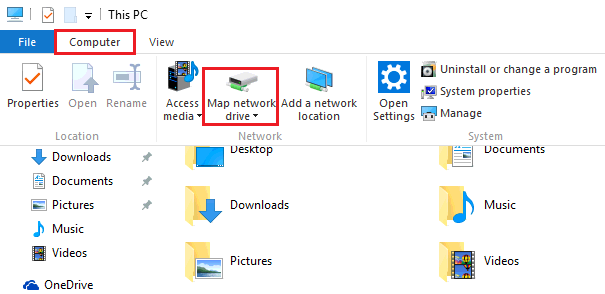
- Click Computer and then click Map network drive.
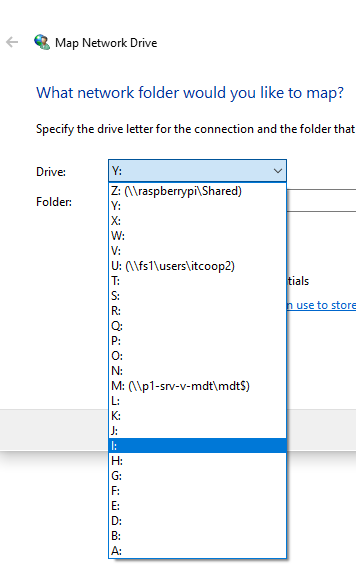
- In the window that opens, choose an available letter from the Drive list.
- In the Folder box, type the network folder path that you wish to map or one that was given by the IT technician
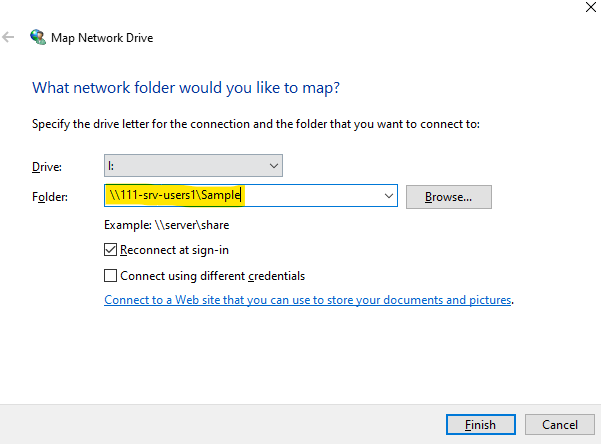
- Click Finish.
- Your mapped drive is now available under This PC.
To find the Network Folder you are looking for please navigate to the Guide posted below
Comments
1 comment
I recently requested that Winnie have access to 2 of my drives. She is having difficulty mapping them. Could you please help her?
Please sign in to leave a comment.