On Outlook:
Open Outlook and click File from the top menu.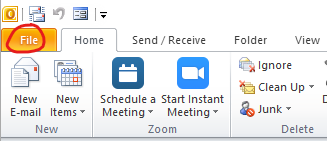
Open > Open Outlook Data File
Locate the .pst file > Double click on the .pst file to open it
All your old emails should be here:
Open Outlook Data Files (.pst)

On Outlook:
Open Outlook and click File from the top menu.
Open > Open Outlook Data File
Locate the .pst file > Double click on the .pst file to open it
All your old emails should be here:
Comments
1 comment
I need help with rolls that was deleted from Miss system. and every time i email Bill the below is what i am getting back. can someone please advise as to who i meet to contack regarding this issue ASAP.
thanks Patricia
From: Email Quarantine <email_quarantine@atlantic.ca>
Sent: Tuesday, December 19, 2023 2:45 PM
To: Patricia Fullerton-Marshall <Patricia_Fullerton-Marshall@Atlantic.ca>
Subject: Your message couldn't be delivered
Your message couldn't be delivered
The message you sent to bill.brown@epssw.com couldn't be delivered due to: Recipient email address is possibly incorrect.
Further information
5.4.1 Recipient address rejected: Access denied. [DS1PEPF00017092.namprd03.prod.outlook.com 2023-12-19T19:45:23.009Z 08DBFD42D1332571]
If you sent this message to multiple addresses, you'll receive a notification like this for every one that didn't arrive.
© 2003 - 2019 Mimecast Services Limited.
Please sign in to leave a comment.